Tapo energy monitoring on PC

See your Tapo energy use on your PC

The Tapo app only lives on your phone. Glowmello brings your Tapo P110 and other energy-monitoring plugs to your Windows 10 or 11 PC: live watts, clear charts, what it's all costing at your own tariff, and a CSV export when you want the numbers in a spreadsheet.

Glowmello's Energy page on a Windows PC showing energy charts and costs for Tapo smart plugs.

What you can see

Your Tapo P110 energy monitoring, on a proper screen

Everything the plugs measure, laid out on your desktop – for one plug or the whole house.

Home

Power now, across every plug

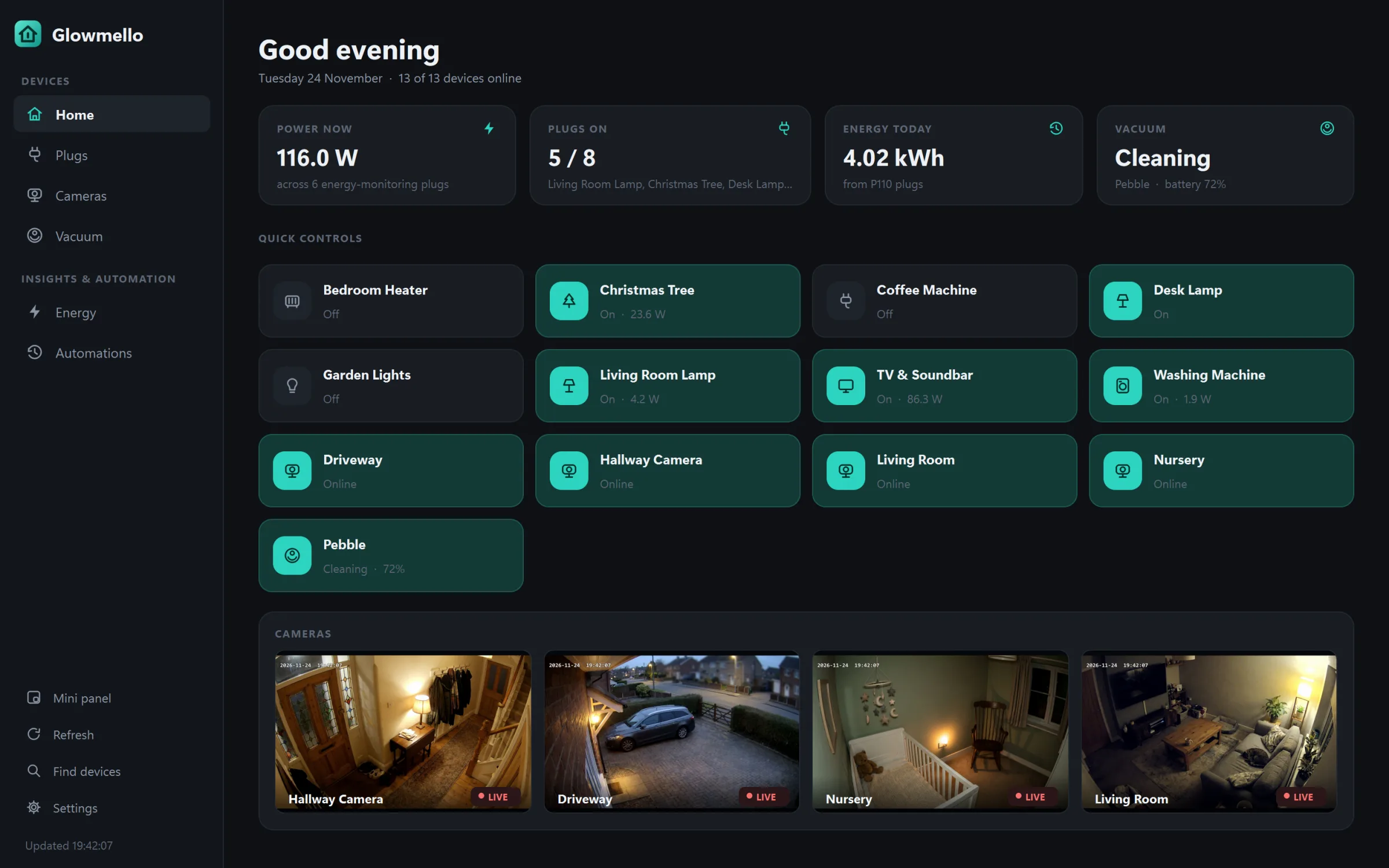
The Home page adds up live power across all your energy-monitoring plugs and shows how much energy you've used today – so you can see at a glance what the house is drawing.

  • Live watts across all plugs
  • Energy used today
  • Which plugs are on right now
The Home dashboard with live power across all plugs and energy used today.
Smart plugs

Every plug, with live watts

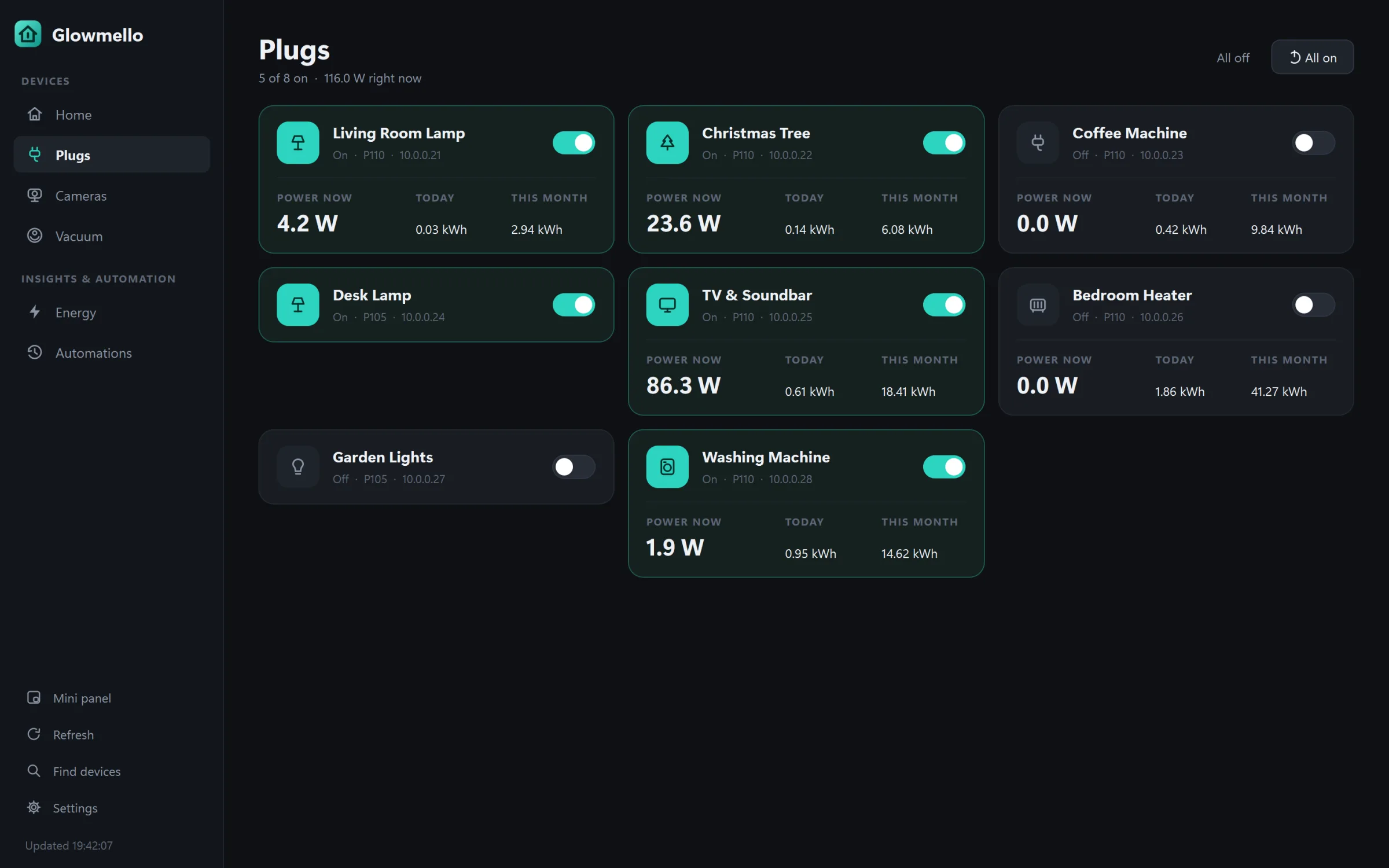
Each energy-monitoring plug shows what it's drawing right now, plus energy used today and this month. Switch any plug on or off from the same screen.

  • Live watts on P110, P115 and similar plugs
  • Energy today and this month
  • On/off switches for every Tapo plug
The Plugs page with on/off switches and live power readings for each Tapo plug.
Energy & costs

Charts and costs at your own price

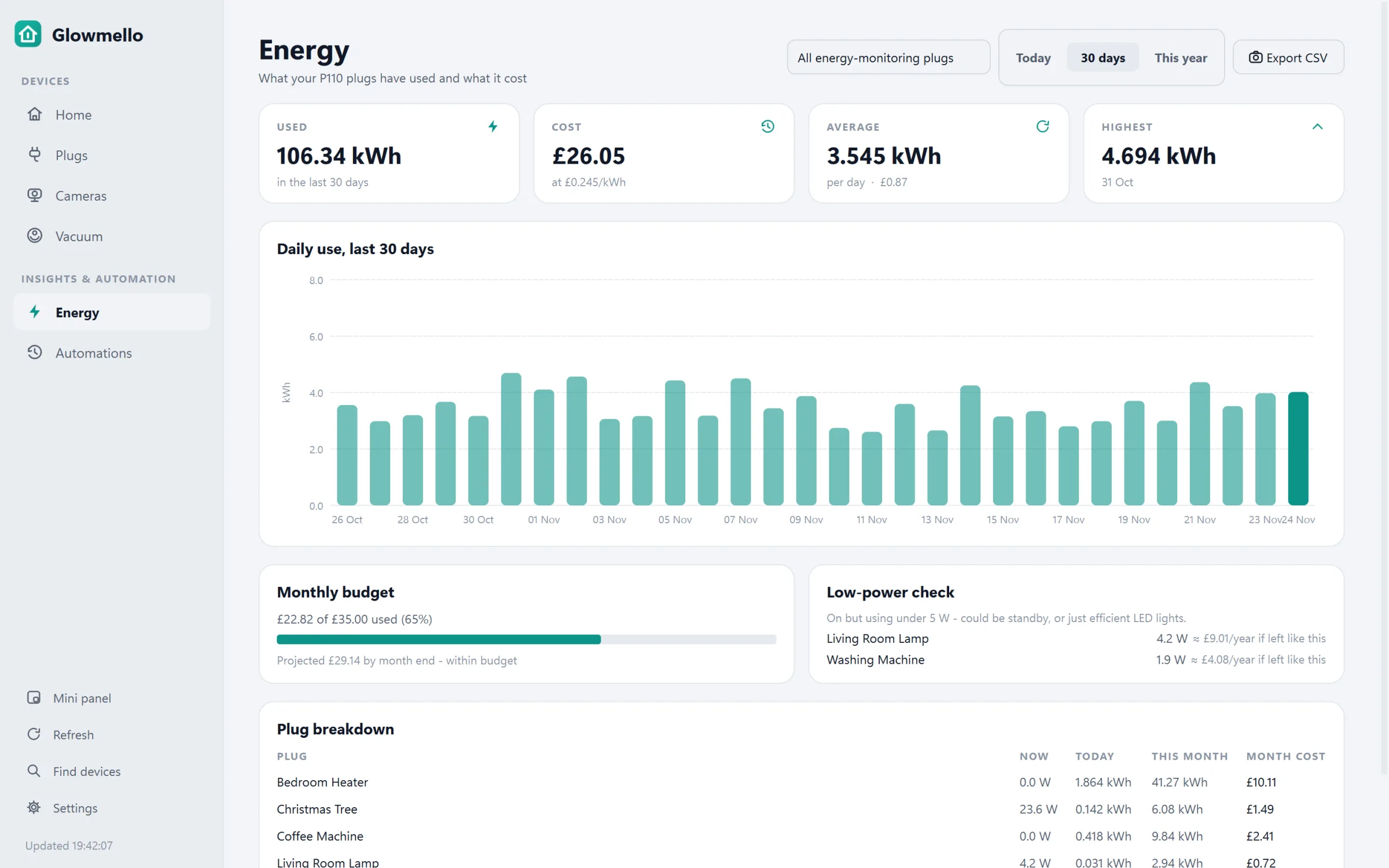
The Energy page has hourly charts for today, the last 30 days and the year – for each plug or the whole home. Enter your electricity price, including off-peak rates, and Glowmello shows what it all costs.

  • Hourly, 30-day and yearly charts
  • Per plug or the whole home
  • Single-rate or time-of-use tariffs

How it's worked out: cost = kWh used × your price per kWh. For example, a 2 kW heater running for 3 hours uses 6 kWh; at 25p per kWh that's about £1.50. Your figures will depend on your appliances and tariff.

The Energy page in light theme with hourly, 30-day and yearly energy charts and costs.

Switch from the tray or mini panel

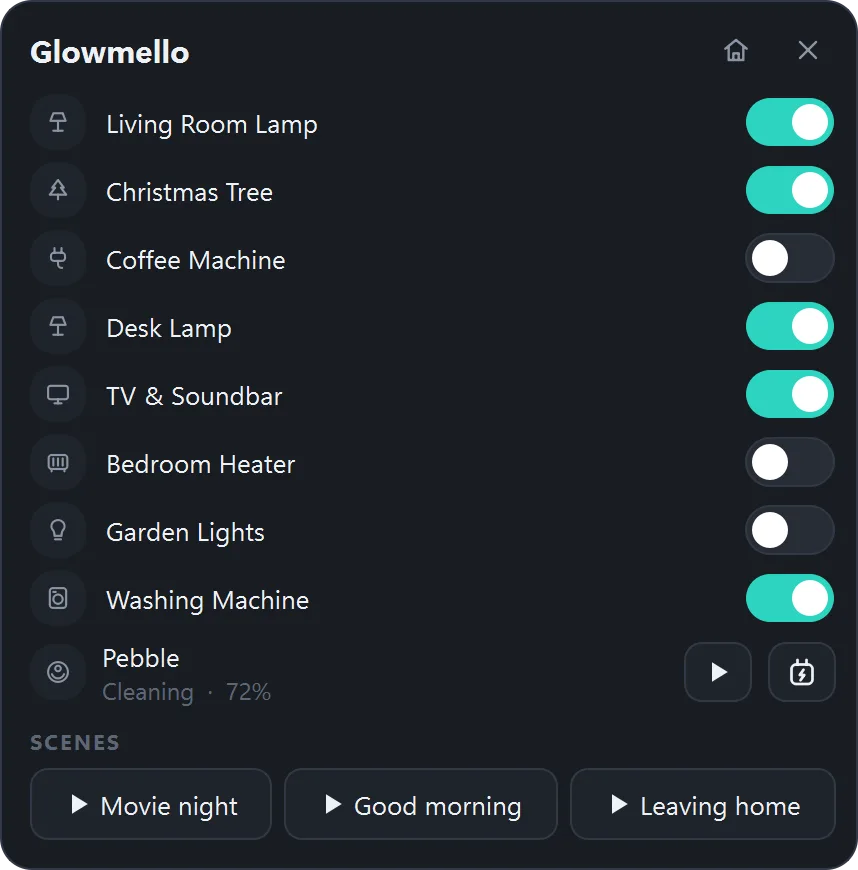
Turn plugs on and off from the system tray, or keep a small always-on-top panel beside your work.

The compact always-on-top mini panel with plug switches and scenes.

Monthly budget

Set a monthly energy budget and get a gentle alert as you approach it.

Standby check

Spot devices that keep drawing power when they're meant to be off or idle.

Export to CSV

Export your Tapo energy data to a CSV file for Excel or any spreadsheet.

Appliance finished

Get told when the washing machine is done – when its power drops below a level for a few minutes.

Your options

Ways to see Tapo energy data on a PC

There's no official Tapo app for Windows. The phone app is free and keeps your history; Home Assistant (with the community Tapo Controller integration, which TP-Link doesn't support) or a Prometheus/Grafana exporter is free and very flexible, but takes some setting up. Here's how they compare.

Feature Tapo phone appTP-Link, free Home Assistant or GrafanaDIY, free Made for PCGlowmelloWindows 10 & 11 app
Runs on WindowsNo – phone onlyIn a browser, with a server runningYes – a normal Windows app
Live wattsYesYesYes
Charts per plug & whole homePer plug, with historyDashboards you buildHourly, 30-day & yearly
Costs incl. off-peak tariffsBasic cost estimatePossible, with setupYes, at your rates
CSV exportExport by emailPossible, with setupYes, one click
PriceFreeFree£6.99 once, no subscription
Setup effortInstall on your phoneServer, integrations & dashboardsSign in once
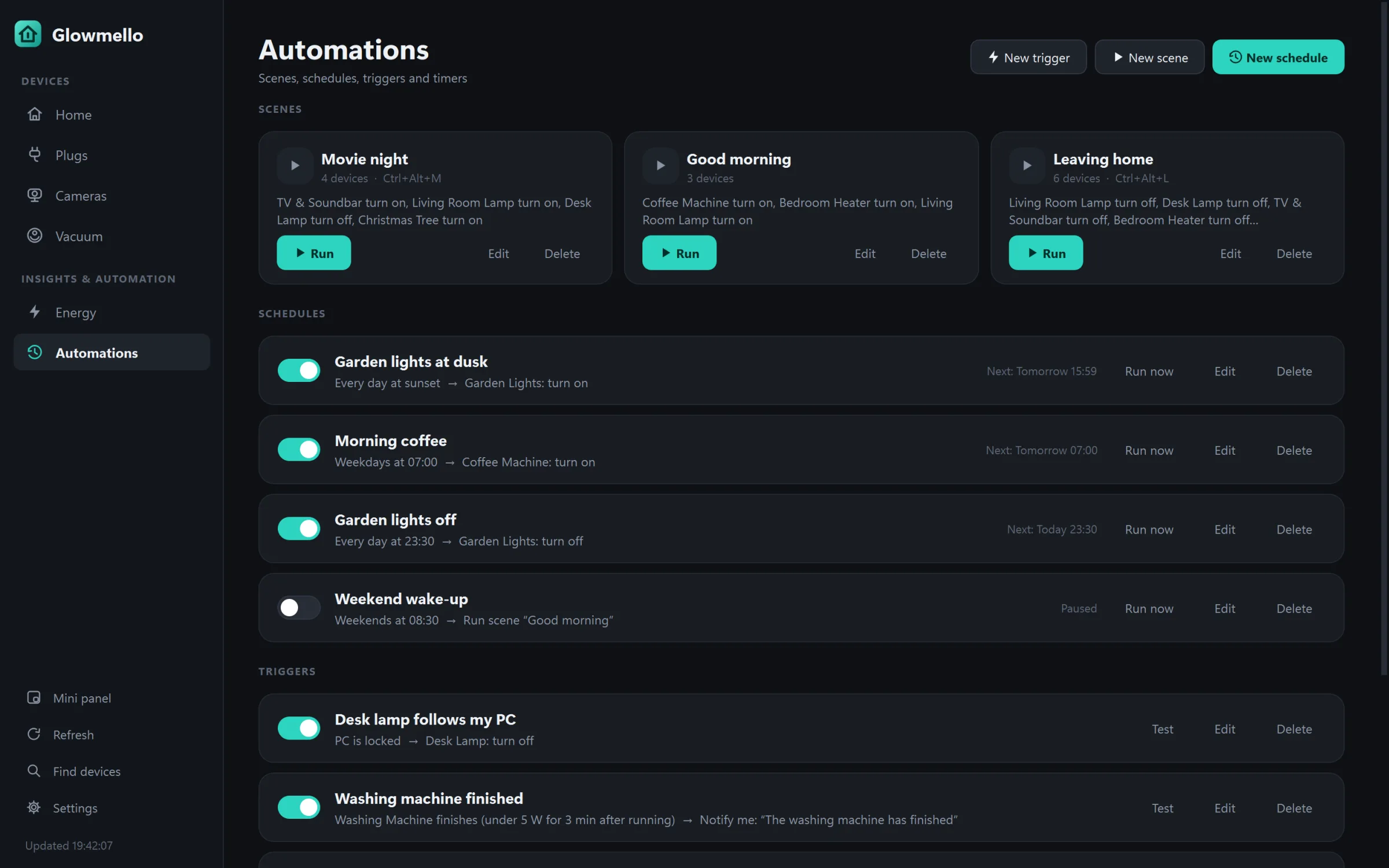
Automations

A Tapo smart plug app for PC that does more than watch

Once your plugs are on your PC, they can work around your day.

  • Scenes to switch several plugs at once
  • Schedules by time, sunrise or sunset
  • Timers – on for an hour, then off
  • PC triggers – like turning the desk lamp off when you lock your PC
The Automations page with scenes, schedules, timers and PC triggers for Tapo plugs.

Setting up

Set up Tapo energy monitoring on your PC in 3 steps

  1. Turn on Third-Party Compatibility

    In the Tapo app on your phone, go to Me › Tapo Lab › Third-Party Compatibility and switch it on.

  2. Install Glowmello on your PC

    Get it from the Microsoft Store on a Windows 10 or 11 PC that's on the same home network as your plugs.

  3. Sign in once

    Sign in with your TP-Link ID and Glowmello finds your plugs. Live watts and energy appear straight away for plugs that measure it. Your password is stored encrypted with Windows Data Protection and only used to talk to your own devices – no cloud in the middle, no tracking.

Compatibility

Which Tapo plugs work?

Energy monitoring Plugs that measure energy, like the Tapo P110, P115 and similar models, show live watts, energy today and this month, charts and costs – and can be switched on and off.

On/off only Plugs without energy monitoring, such as the P105, can still be switched, scheduled and used in scenes – they just don't report watts or kWh.

Newer devices that use TP-Link's newer security are supported too. Glowmello is an independent app and isn't made by or affiliated with TP-Link.

FAQ

Tapo energy monitoring on PC – questions

Can I see Tapo P110 energy use on my PC?

Yes. Glowmello is a Windows 10 and 11 app that reads your Tapo P110 – and other energy-monitoring Tapo plugs such as the P115 – over your home network. You get live watts, energy used today and this month, and hourly, 30-day and yearly charts for each plug or your whole home.

Is there a Tapo app for Windows?

Not from TP-Link – the official Tapo app is for phones only. On a PC your options are a DIY setup such as Home Assistant or Grafana, or a Windows app made for Tapo, like Glowmello.

Can I export my Tapo energy data?

Yes. The Tapo phone app can export energy data (people report it arrives by email). Glowmello exports your energy data straight to a CSV file on your PC, ready to open in Excel or any spreadsheet.

Does it work with the Tapo P105?

Yes, for switching. The P105 doesn't measure energy, so you can turn it on and off and use it in scenes, schedules and timers, but it won't show watts or kWh. For energy monitoring you need a plug like the P110 or P115.

Does it work with off-peak tariffs like Economy 7 or Octopus?

Yes. You enter your own rates – a single price per kWh, or a time-of-use tariff with cheaper off-peak hours – and Glowmello works out your costs using the right rate for when the energy was used. There's no link to your supplier; you simply type in the prices from your bill.

Does my energy data go to the cloud?

No. Glowmello talks to your plugs directly on your home network – there's no cloud in the middle and no tracking. You sign in with your TP-Link ID once so it can find your plugs; the password is stored encrypted with Windows Data Protection and only used to talk to your own devices.

Every watt. One calm screen.

£6.99 once, no subscription. Glowmello also shows your Tapo cameras on PC and runs your Tapo robot vacuum from your PC. See everything it does.